
The Common Vulnerability Scoring System (CVSS) provides a structured and standardised way of rating vulnerability severity. This module explains how to apply it correctly and responsibly.
In this section of the “Mastering Security Testing for Python” course, we’ll focus on improving your reporting practices by incorporating the Common Vulnerability Scoring System (CVSS). Effective reporting is crucial in security testing—it not only communicates findings clearly but also helps stakeholders prioritize remediation efforts. CVSS provides a standardized way to quantify vulnerability severity, making your reports more professional, actionable, and comparable across projects. We’ll start by explaining what CVSS is, then dive into its application in testing and reporting for Python applications.
CVSS Scoring
The Common Vulnerability Scoring System (CVSS) provides a standardised method to assess severity.
When assigning CVSS:
Justify each metric (Attack Vector, Privileges Required, User Interaction, etc.)
Avoid inflating scores for dramatic effect
Consider environmental factors (internal tool vs internet-facing API)
What is CVSS?
The Common Vulnerability Scoring System (CVSS) is an open, industry-standard framework for assessing and rating the severity of security vulnerabilities in software systems. Developed and maintained by the Forum of Incident Response and Security Teams (FIRST.org), it was first released in 2005 and has evolved through versions, with the latest being CVSS v4.0 as of 2023. CVSS is not a risk assessment tool but rather a method to provide a qualitative measure of vulnerability severity, helping organizations compare and prioritize issues across different applications and vendors.
At its core, CVSS generates a numerical score ranging from 0.0 (least severe) to 10.0 (most severe), which can be translated into qualitative ratings like Low, Medium, High, or Critical. This score is derived from a set of metrics that describe the vulnerability’s characteristics. The score is represented as a “vector string,” a compact text format that encodes the metric values (e.g., CVSS:4.0/AV:N/AC:L/AT:N/PR:N/UI:N/V:H/VI:H/VA:H/SC:N/SI:N/SA:N). This allows for easy sharing and recalculation.
CVSS consists of several metric groups:
Base Metrics: Intrinsic qualities of the vulnerability that don’t change over time, such as how it’s exploited and its impact on confidentiality, integrity, and availability.
Threat Metrics (formerly Temporal): Factors that may change, like exploit code maturity or remediation availability.
Environmental Metrics: Organization-specific adjustments, such as the value of affected assets or existing mitigations.
Supplemental Metrics (new in v4.0): Additional context like safety impact or recovery options.
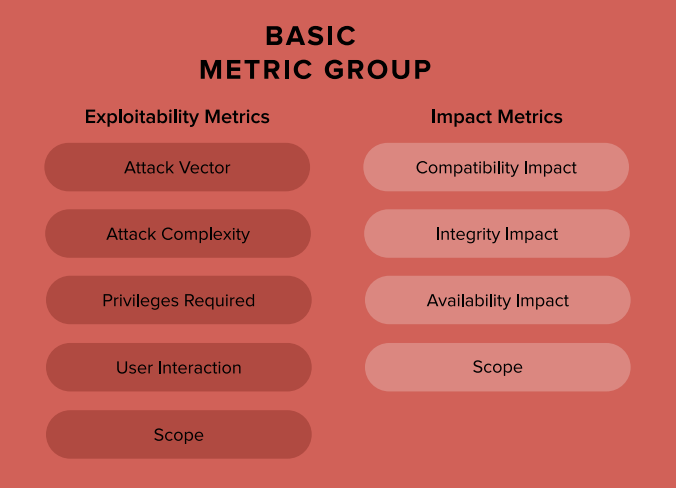
Here’s a visual breakdown of the Base Metric Group, which forms the foundation of most CVSS scores:
The overall score helps in prioritization: for example, vulnerabilities scoring 9.0–10.0 are Critical and demand immediate attention, while those below 4.0 are Low and may be deprioritized. The following table summarizes severity levels based on CVSS v3.x/v4.0 (note that exact thresholds can vary slightly by version):
| CVSS Score Range | Severity Level | Description and Guidance |
|---|---|---|
| 0.0 | None | No impact; no action needed. |
| 0.1–3.9 | Low | Minor issues; monitor but low priority for fixes. |
| 4.0–6.9 | Medium | Noticeable impact; schedule remediation. |
| 7.0–8.9 | High | Significant risk; prioritize fixes. |
| 9.0–10.0 | Critical | Severe; immediate remediation required to prevent exploitation. |
This table is adapted from common practices in vulnerability databases like the National Vulnerability Database (NVD). For a rubric example on assessing impacts (e.g., integrity), see the CVSS v4.0 User Guide:
Base vs Environmental Scoring:
Base Score – intrinsic technical severity
Temporal Score – considers exploit maturity
Environmental Score – adjusted for business context
For example:
A remote code execution in an internal CI server may have a high Base score.
If the system is segmented and requires VPN + MFA, the Environmental score may be lower.
CVSS is useful for:
Standardisation
Comparing findings across projects
Supporting prioritisation discussions
However, CVSS is not a substitute for business risk analysis.
How CVSS Can Be Used in Testing Python Applications
In security testing for Python applications—whether you’re using tools like Python Code Audit for static analysis, or OWASP ZAP for dynamic testing—CVSS elevates your reporting from subjective descriptions (e.g., “this SQL injection is bad”) to objective, quantifiable assessments. When you identify a vulnerability, such as a command injection in a Python web app or a deserialization flaw in a library like pickle, you can apply CVSS to score it based on real-world exploitability and impact.
Here’s how to integrate CVSS into your testing workflow:
Identify the Vulnerability: During testing, document the issue (e.g., CVE if known, or a custom description). For Python-specific vulns, consider common issues like insecure dependencies (via pip-audit) or code injection in eval() statements.
Assess Metrics: Use a CVSS calculator to evaluate:
Exploitability Metrics: Attack Vector (e.g., Network for remote exploits), Attack Complexity (Low if no special conditions), Privileges Required (None for unauthenticated attacks), User Interaction (None if automated), and Scope (Changed if it affects other components).
Impact Metrics: Effects on Confidentiality (e.g., High if data is leaked), Integrity (High if data is altered), and Availability (High if it causes denial-of-service).
Adjust for Threat and Environmental factors, like if an exploit is publicly available or if your Python app runs in a containerized environment with mitigations.
Tools like the official FIRST.org calculator or NVD’s online version make this straightforward.
Calculate and Include in Reports: Generate the score and vector string. In your report, include:
The CVSS score and rating.
The vector for transparency.
An explanation of why certain metrics were chosen (e.g., “Attack Vector: Network because the vuln is exploitable via HTTP requests”).
Prioritization recommendations based on the score.
This helps developers and security teams understand the urgency. For instance, a Critical (9.8) deserialization vuln in a Python API might prompt immediate patching, while a Low (3.5) info leak could be batched.
Compute CVSS scores : An option to do this is by using:
Common Vulnerability Scoring System Calculator or create a script using:
cvss(from PyPI): Supports v2, v3, and v4 calculations with an interactive calculator.Example Python code using the
cvsslibrary (install viapip install cvss):from cvss import CVSS3 # For v3; similar for v4 # Define a vector for a hypothetical Python vuln (e.g., remote code execution) vector = 'CVSS:3.1/AV:N/AC:L/PR:N/UI:N/S:U/C:H/I:H/A:H' c = CVSS3(vector) print(f"Score: {c.scores()[0]}") # Outputs the base score print(f"Severity: {c.severities()[0]}") # e.g., 'Critical'
Integrate this into your testing pipeline (e.g., with pytest or a CI/CD script) to auto-generate scores for discovered issues.
Best Practices for Reporting:
Always use the latest CVSS version (v4.0) for new reports.
Combine with other frameworks like CWE (Common Weakness Enumeration) for a fuller picture.
Avoid over-reliance on Base scores; incorporate Environmental metrics for context-specific accuracy.
In Python apps, consider ecosystem factors like dependency vulnerabilities (scored via tools like Safety CLI, which often include CVSS).
For further reading, check the official CVSS User Guide or experiment with online calculators to build familiarity.